강의노트 계산기 작성
강의노트
• 조회수 3414
• 댓글 0
• 작성 2년 전
• 수정 3개월 전
계산기 작성
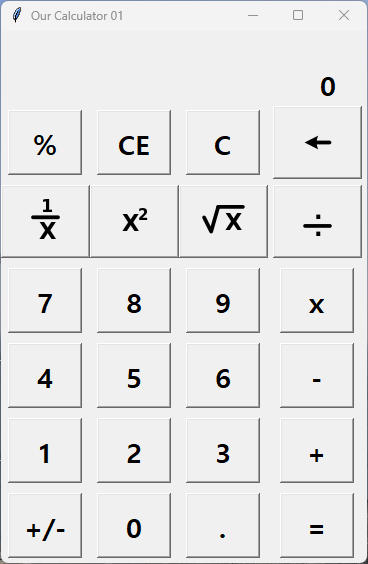
윈도우에서 제공하는 계산기를 벤치마크한 계산는 다음과 같다.
( 2025년 2학기 수업 내용으로 업데이터한 내용임)
import tkinter as tk
from PIL import ImageTk, Image

root = tk.Tk()
root.title('Our Calculator 01')
def func(s):
    global ind

    s = str(s)
    n = lbl1.cget('text')
    if len(n) < 20:
        if ind == 1:
            # 기능 버튼이 눌렸을때
            lbl1.config(text='')
            n = '0'
            ind = 0
        if n == '0':
            if s == '.':
                lbl1.config(text=n+s)
            elif s == '0':
                lbl1.config(text=s)
            else:
                lbl1.config(text=s)
        else:
            if s =='.':
                if n.count('.')==0:
                    lbl1.config(text=n+s)
            else:
                lbl1.config(text=n+s)


def fC():
    lbl1.config(text='0')
    lbl0.config(text='')

def fCE():
    lbl1.config(text='0')

def foperation(op):
    # 하나씩 기능을 추가 메모리기 필요없음.
    global ind   #, mem, op
    n1 = lbl1.cget('text')
    n0 = lbl0.cget('text')
    if n0.find('=')>0:
        n0 = ''

    lbl0.config(text=n0 +' '+ n1+' '+ op)
    ind = 1
    #mem = n
    #op = '+'

def fpm():
    n1 = lbl1.cget('text')
    n1 = '(-1)*'+n1
    n1 = str(eval(n1))
    n1 = lbl1.config(text=n1)

def fsqrt():
    n1 = lbl1.cget('text')
    n1 = '( '+n1+' )'+'**0.5'
    lbl0.config(text=n1+' =')
    n1 = str(eval(n1))
    lbl1.config(text=n1)

def fpow():
    n1 = lbl1.cget('text')
    n1 = '( '+n1+' )'+'**2'
    lbl0.config(text=n1+' =')
    n1 = str(eval(n1))
    lbl1.config(text=n1)

def finv():
    n1 = lbl1.cget('text')
    n1 = '1 / '+n1
    lbl0.config(text=n1+' =')
    n1 = str(eval(n1))
    lbl1.config(text=n1)

def fback():
    n1 = lbl1.cget('text')
    n1 = n1[0:len(n1)-1]
    if n1 == '':
        n1 = '0'
    lbl1.config(text=n1)

def fper():
    n1 = lbl1.cget('text')
    n0 = lbl0.cget('text')
    if n0[-1] == '=':
        n0 = n0[0:len(n0)-1]
        n2 = n0+'* '+n1+'/100'
        res = str(eval(n2))
        lbl0.config(text=n2+' =')
        lbl1.config(text=res)

'''
def fplus():
    global ind, mem, op
    n = lbl1.cget('text')
    lbl0.config(text=n + ' + ')
    ind = 1
    mem = n
    op = '+'

def fminus():
    global ind, mem, op
    n = lbl1.cget('text')
    lbl0.config(text=n + ' - ')
    ind = 1
    mem = n
    op = '-'

def fmult():
    global ind, mem, op
    n = lbl1.cget('text')
    lbl0.config(text=n + ' x ')
    ind = 1
    mem = n
    op = 'x'

def fdiv():
    global ind, mem, op
    n = lbl1.cget('text')
    lbl0.config(text=n + ' / ')
    ind = 1
    mem = n
    op = '/'
'''
def fequal():
    global mem, ind
    n0 = lbl0.cget('text')
    n1 = lbl1.cget('text')
    if n0.find('=')>0:
        n0 = ''
    n0 = n0 + ' ' +n1
    lbl0.config(text=n0+' =')
    res = eval(n0)
    lbl1.config(text=str(res))
    ind = 1

    '''
    if op == '+':
        n1 = lbl1.cget('text') # 456
        n0 = lbl0.cget('text') # 123 +
        res = int(mem) + int(n1)
        lbl1.config(text=str(res))
        n0 = n0 + n1 + ' ='
        lbl0.config(text=n0)
    elif op == '-':
        n1 = lbl1.cget('text') # 456
        n0 = lbl0.cget('text') # 123 +
        res = int(mem) - int(n1)
        lbl1.config(text=str(res))
        n0 = n0 + n1 + ' ='
        lbl0.config(text=n0)
    elif op == 'x':
        n1 = lbl1.cget('text') # 456
        n0 = lbl0.cget('text') # 123 +
        res = int(mem) * int(n1)
        lbl1.config(text=str(res))
        n0 = n0 + n1 + ' ='
        lbl0.config(text=n0)
    elif op == '/':
        n1 = lbl1.cget('text') # 456
        n0 = lbl0.cget('text') # 123 +
        res = int(mem) / int(n1)
        lbl1.config(text=str(res))
        n0 = n0 + n1 + ' ='
        lbl0.config(text=n0)
    '''

sqrtImage = Image.open('sqrt.png')
sqrtPhoto = ImageTk.PhotoImage(sqrtImage)

powImage = Image.open('power2.png')
powPhoto = ImageTk.PhotoImage(powImage)

invImage = Image.open('inv.png')
invPhoto = ImageTk.PhotoImage(invImage)

divImage = Image.open('division.png')
divPhoto = ImageTk.PhotoImage(divImage)

backImage = Image.open('back.png')
backPhoto = ImageTk.PhotoImage(backImage)

ind = 0
mem = 0

lbl0 = tk.Label(root,text='',font=('Malgun Gothic',14),width=29,anchor='e')
lbl1 = tk.Label(root,text='0',font=('Malgun Gothic',20,'bold'),width=19,anchor='e')
bnt0 = tk.Button(root,text='0',width=4,font=('Malgun Gothic',20,'bold'),command=lambda:func(0))
bnt1 = tk.Button(root,text='1',width=4,font=('Malgun Gothic',20,'bold'),command=lambda:func(1))
bnt2 = tk.Button(root,text='2',width=4,font=('Malgun Gothic',20,'bold'),command=lambda:func(2))
bnt3 = tk.Button(root,text='3',width=4,font=('Malgun Gothic',20,'bold'),command=lambda:func(3))
bnt4 = tk.Button(root,text='4',width=4,font=('Malgun Gothic',20,'bold'),command=lambda:func(4))
bnt5 = tk.Button(root,text='5',width=4,font=('Malgun Gothic',20,'bold'),command=lambda:func(5))
bnt6 = tk.Button(root,text='6',width=4,font=('Malgun Gothic',20,'bold'),command=lambda:func(6))
bnt7 = tk.Button(root,text='7',width=4,font=('Malgun Gothic',20,'bold'),command=lambda:func(7))
bnt8 = tk.Button(root,text='8',width=4,font=('Malgun Gothic',20,'bold'),command=lambda:func(8))
bnt9 = tk.Button(root,text='9',width=4,font=('Malgun Gothic',20,'bold'),command=lambda:func(9))
bntpoint = tk.Button(root,text='.',width=4,font=('Malgun Gothic',20,'bold'),command=lambda:func('.'))
bntpm = tk.Button(root,text='+/-',width=4,font=('Malgun Gothic',20,'bold'),command=fpm)
bntequal = tk.Button(root,text='=',width=4,font=('Malgun Gothic',20,'bold'),command=fequal)
bntplus = tk.Button(root,text='+',width=4,font=('Malgun Gothic',20,'bold'),command=lambda:foperation('+'))
bntminus = tk.Button(root,text='-',width=4,font=('Malgun Gothic',20,'bold'),command=lambda:foperation('-'))
bntmul = tk.Button(root,text='x',width=4,font=('Malgun Gothic',20,'bold'),command=lambda:foperation('*'))
bntdiv = tk.Button(root,image=divPhoto,width=83,height=67,command=lambda:foperation('/'))
bntsqrt = tk.Button(root,image=sqrtPhoto,width=83,height=67,command=fsqrt)
bntpow = tk.Button(root,image=powPhoto,width=83,height=67,command=fpow)
bntinv = tk.Button(root,image=invPhoto,width=83,height=67,command=finv)
bntper = tk.Button(root,text='%',width=4,font=('Malgun Gothic',20,'bold'),command=fper)
bntce = tk.Button(root,text='CE',width=4,font=('Malgun Gothic',20,'bold'),command=fCE)
bntc = tk.Button(root,text='C',width=4,font=('Malgun Gothic',20,'bold'),command=fC)
bntback = tk.Button(root,image=backPhoto,width=83,height=67,command=fback)

lbl0.grid(row=0, column=0,columnspan=4)
lbl1.grid(row=1, column=0,columnspan=4)

bnt0.grid(row=7, column=1)
bnt1.grid(row=6, column=0,pady=5)
bnt2.grid(row=6, column=1)
bnt3.grid(row=6, column=2)
bnt4.grid(row=5, column=0,pady=5)
bnt5.grid(row=5, column=1)
bnt6.grid(row=5, column=2)
bnt7.grid(row=4, column=0,pady=5)
bnt8.grid(row=4, column=1)
bnt9.grid(row=4, column=2)
bntpoint.grid(row=7, column=2)
bntpm.grid(row=7, column=0,pady=5)
bntequal.grid(row=7, column=3)
bntplus.grid(row=6, column=3)
bntminus.grid(row=5, column=3)
bntmul.grid(row=4, column=3)
bntdiv.grid(row=3, column=3,pady=5)
bntsqrt.grid(row=3, column=2)
bntpow.grid(row=3, column=1)
bntinv.grid(row=3, column=0)
bntper.grid(row=2, column=0,padx=5,pady=5)
bntce.grid(row=2, column=1,padx=5)
bntc.grid(row=2, column=2,padx=5)
bntback.grid(row=2, column=3,padx=5)

root.mainloop()
첫 글입니다.
마지막 글입니다.
로그인 하면 댓글을 쓸 수 있습니다.